Getting your credentials uploaded correctly is often the difference between starting your next healthcare role in two weeks or two months. For nurses, recent graduates, and allied health professionals, the process of credentialing — formally known as primary source verification — can feel opaque and slow. But the truth is, most placement delays come down to avoidable upload errors, missed deadlines, and mismatched file formats. This guide walks you through exactly what you need, how to do it right, and how to keep your profile active so employers can move on you fast.
Table of Contents
- Key takeaways
- What you need before uploading healthcare credentials for quick placement
- Step-by-step portal upload process
- Common mistakes and how to fix them
- How to verify upload success and monitor placement readiness
- My take on credential uploads and placement speed
- Get placed faster with Flexiblenursingcareers
- FAQ
Key takeaways
| Point | Details |
|---|---|
| Prep documents before logging in | Gather all required credentials, formatted correctly, before starting any portal upload. |
| File format matters as much as content | EPIC rejects files outside approved formats; a wrong file type stalls your entire verification. |
| CAQH requires active re-attestation | You must re-attest every 120 days or your profile goes inactive, delaying placement. |
| Upload early to avoid fee increases | ECFMG fees rose in April 2026; submitting ahead of deadlines saves both money and time. |
| Monitor your status after upload | Regularly check portal dashboards to catch and fix issues before they delay your start date. |
What you need before uploading healthcare credentials for quick placement
Before you log into any portal, stop. The biggest time wasters in healthcare credential submission are not technical glitches. They are professionals showing up unprepared, uploading the wrong file version, or realizing mid-process that a document is missing.
Here is what you need to have ready:
- Government-issued photo ID (passport or driver's license)
- Nursing or medical license (current and unencumbered)
- Nursing school diploma or medical degree certificate
- NCLEX results or equivalent examination documentation
- BLS/ACLS certifications (must be current)
- Professional references or recommendation letters
- Immunization records and health clearances
- Malpractice history documentation if applicable
- CV or resume tailored to the role you are applying for
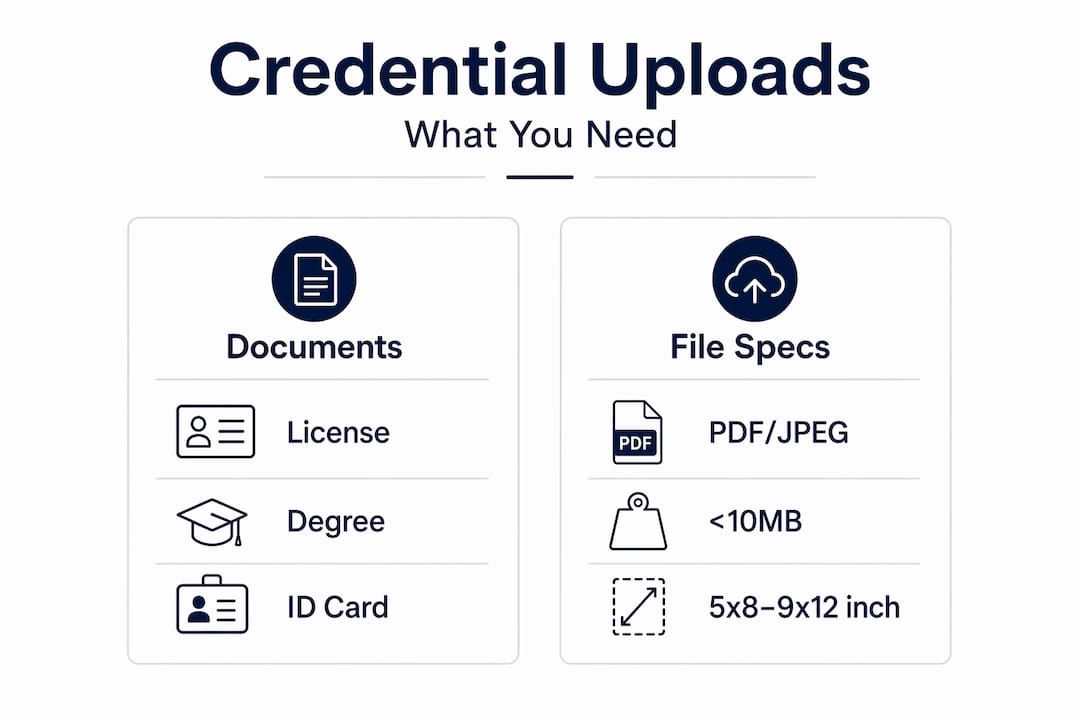
Beyond having the right documents, you need them in the right format. EPIC accepts DOCX, GIF, JPG/JPEG, PDF, PNG, and TIFF file types, with a maximum file size of 10MB and page dimensions between 5x8 and 9x12 inches. If your scan falls outside those dimensions or exceeds the size limit, the system will reject it. No error message, no second chance. Just a rejection that sends you back to square one.
| Requirement | Specification |
|---|---|
| Accepted file types | DOCX, GIF, JPG/JPEG, PDF, PNG, TIFF |
| Maximum file size | 10MB per upload |
| Page size range | 5x8 to 9x12 inches |
| Multi-page documents | Must be combined into one single file |
If any of your documents are not in English, get official translations done before you begin. Submitting untranslated documents will result in rejection and restart the clock on your verification timeline.

Pro Tip: Scan all documents at 300 DPI in black and white. This keeps file sizes manageable while preserving legibility, which is exactly what portal reviewers need.
You will also need active accounts on the relevant platforms. For physicians and international medical graduates, that means MyIntealth for EPIC access. For most practicing nurses and allied health professionals in the US, CAQH ProView is the central credentialing hub. Set up those accounts before your documents are ready so there is no delay once you are ready to go.
Step-by-step portal upload process
Knowing which portal to use and how it works cuts the time it takes to complete efficient credentialing services dramatically. Here is how to move through both EPIC and CAQH correctly.
Uploading through EPIC via MyIntealth
- Log into MyIntealth at myintealth.org.
- Select "Services" from the top navigation menu.
- Click "EPIC" to access the Electronic Portfolio of International Credentials.
- Select "Establish Portfolio" and complete all required fields. You cannot submit a verification request until your portfolio is active.
- Once your portfolio is confirmed, select "Submit Credential Verification Request."
- Upload your documents in the approved formats, combined into a single file where required.
- Pay the applicable fees. Note that EPIC Portfolio Establishment now costs $35 and a Credential Verification Request costs $110 as of April 2026.
- Submit and note your confirmation number.
A common mistake people make is trying to upload credentials before the portfolio is established. Delays occur specifically when credential uploads are attempted before the portfolio is active. Do not skip step 4.
Uploading through CAQH ProView
- Log into your CAQH ProView account at proview.caqh.org.
- Complete or update all sections of your provider profile, including personal data, practice locations, and education history.
- Upload supporting documents for each section that requires them.
- Review the entire profile for accuracy before submitting.
- Complete the attestation, which is a legal certification confirming all information is correct and current.
- Note the date of your attestation. You will need to re-attest every 120 days to keep your profile active.
Pro Tip: Do not wait until your CAQH profile is flagged inactive to take action. Set a calendar reminder for day 100 after each attestation so you have time to review and update before the 120-day window closes.
On timing: if you are working through EPIC, planning uploads around fee structures can reduce unnecessary costs. The April 2026 fee increases are already in effect, so factor those amounts into your budget before submitting.
Common mistakes and how to fix them
Most credential rejection issues fall into predictable categories. Knowing them ahead of time saves you days or even weeks on your placement timeline.
- Wrong file format or oversized file. Format errors are one of the leading causes of processing delays and outright rejections. Always double-check file type and size before submitting.
- Uploading separate pages instead of a combined file. EPIC requires multi-page documents to be merged into one file. Uploading individual pages causes rejections.
- Missing a hard deadline. Some healthcare placement applications require documents before a specific cut-off date, and missing that deadline can result in disqualification from the cohort entirely.
- Misunderstanding CAQH attestation. Many providers assume that uploading a renewed license or certification resets their CAQH timeline. It does not. Attestation on CAQH is an active legal certification requiring all data to be confirmed every 120 days. Only completing the full attestation process resets the clock.
- Submitting untranslated documents. Any credential not in English must include a certified translation. Reviewers will not process untranslated materials.
- Incorrect document corrections. If a document is returned for correction, fix only the flagged issue and resubmit. Submitting an entirely new file when a minor correction was requested often creates a new processing queue entry.
The single most overlooked fact in credential submission is that technical compliance matters more than having the right documents. You can have every certificate in perfect order and still sit in limbo for weeks because of a formatting error. Get the format right first.
If your documents are returned, read the rejection reason carefully. Most portals tell you exactly what is wrong. Act on it within 24 hours if you can. The faster you resubmit, the faster verification continues.
How to verify upload success and monitor placement readiness
Submitting your documents is not the finish line. Confirming that the portal accepted them and that your profile is in good standing is what actually gets you placed. Here is how to stay on top of it.
- Check your portal dashboard within 24 hours of submission. Both EPIC and CAQH ProView show real-time status indicators for each uploaded document. Look for "received," "in review," or "verified." A status of "pending" with no movement after 48 hours is worth a follow-up.
- Look for confirmation emails. Both systems send email notifications for key status changes. Add the portal email addresses to your safe senders list so they do not land in spam.
- Track CAQH re-attestation dates. Keeping an internal calendar for attestation deadlines prevents the profile inactivity that stalls onboarding. Mark your 120-day cycle clearly.
- Follow up on verification timelines proactively. If a specific credential has been in review longer than the stated processing window, contact the portal's support team. Most have a formal inquiry process that can accelerate stuck verifications.
- Keep copies of everything. Store all submitted documents, confirmation numbers, and status screenshots in a dedicated folder. If a dispute arises, you have a complete paper trail.
Pro Tip: Create a simple spreadsheet tracking each credential, its submission date, its portal status, and its expiration or renewal date. You will never miss a deadline again and you will know instantly if something is overdue.
Understanding how credential timing impacts placement is not just about one job. It is a habit that shapes your entire career velocity. Professionals who treat their credential profile as a living document get placed faster, get better roles, and have fewer gaps between positions. Applying for quick-hire medical roles becomes far easier when your credentials are already current and verified.
My take on credential uploads and placement speed
I have seen hundreds of healthcare professionals go through this process. The ones who get placed quickly are not always the most experienced. They are the most prepared.
What I have learned is that credential timing is the hidden variable in career progression that almost nobody talks about. You can have the perfect resume, ace the interview, and still lose a position to someone who had their CAQH profile attested and their EPIC portfolio active before the job was even posted. Employers cannot wait. When a unit needs coverage, they move to the next candidate who is ready.
The thing most people get wrong is treating credential submission as a reactive task. Something to do when a job comes up. In my experience, that mindset costs you two to three weeks every single time. By the time you scan, format, upload, wait for verification, and handle any corrections, the window closes.
The professionals who consistently land placements fast treat their credential profile the way a pilot treats a preflight checklist. It is always current. Always confirmed. When an opportunity appears, they say yes on day one instead of day fifteen.
I also think automation in job placement is changing what it means to be "placement ready." Platforms that can verify and match in real time reward professionals who have done the upfront work on their profiles. That investment pays back every time.
— Flexible
Get placed faster with Flexiblenursingcareers
You have done the hard work of building your credentials. Now put them where they work for you.

Flexiblenursingcareers is built for exactly this moment. The platform connects nurses and healthcare professionals with flexible roles matched to their skills, schedule, and location in real time. No lengthy back-and-forth. No waiting weeks to hear back. When your documents are in order, sign in and get started to upload your credentials and get matched with available positions immediately. The system is designed so you spend less time on paperwork and more time working. If you are a recent graduate or returning professional looking to move quickly, this is where prepared candidates go to get placed fast.
You can also review efficient application strategies to pair with your credential upload process for maximum speed.
FAQ
What documents do I need to upload credentials for healthcare placement?
You typically need a current license, photo ID, nursing or medical degree certificate, exam results, BLS/ACLS certifications, immunization records, and a CV. Requirements vary by employer and role.
How long does healthcare credential verification take?
Verification timelines vary by portal and document type, but format errors and missing files are the most common causes of delays. Submitting correctly formatted files the first time is the fastest path through.
How often do I need to re-attest on CAQH ProView?
CAQH ProView requires re-attestation every 120 days. Missing this deadline makes your profile inactive, which stalls any active placement or credentialing process.
What file types does EPIC accept for credential uploads?
EPIC accepts DOCX, GIF, JPG/JPEG, PDF, PNG, and TIFF files up to 10MB. Pages must fall within the 5x8 to 9x12 inch size range and multi-page documents must be combined into one file.
Can I upload credentials to EPIC before setting up my portfolio?
No. You must first establish your EPIC Portfolio through MyIntealth before submitting any credential verification requests. Attempting to upload before that step will result in delays.